By Vyrex HQ | November 23, 2025
A simple breakdown of what the app does, how it works, and who it's for.
Share this post
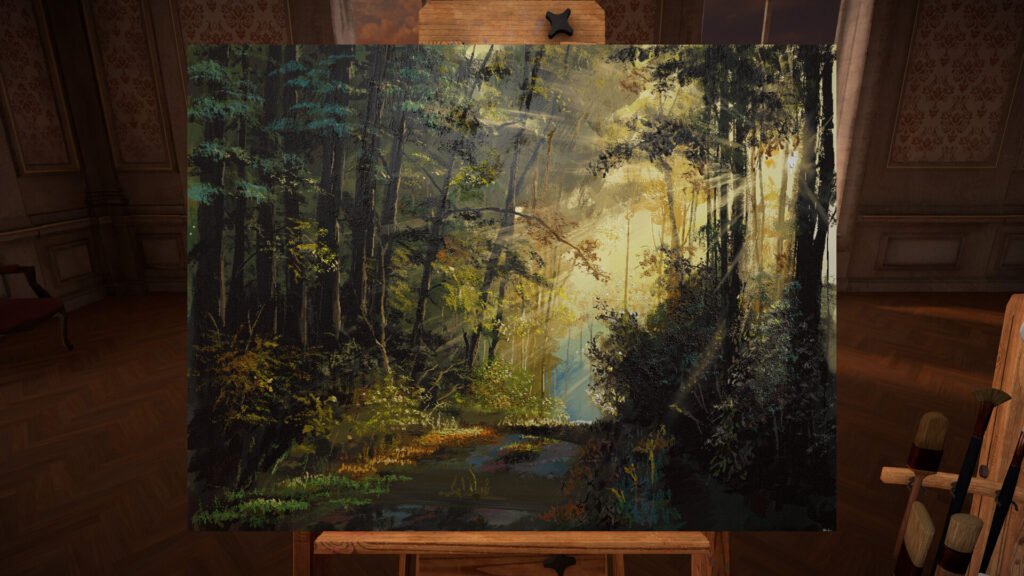
Before downloading any VR app, it helps to know what kind of experience you’re getting into. This breakdown covers how Vermillion VR works, what it focuses on, and the type of user it suits best so you can decide if it’s the right fit for you.
Vermillion VR is designed for people who love creativity, painting, and the relaxing rhythm of brushwork. It’s made for anyone who wants to bring traditional art techniques into virtual reality and express themselves freely on a digital canvas.
Art Enthusiasts
Those who enjoy the tactile and detailed feel of oil painting will find this experience familiar. The brushwork, mixing, and layering capture much of what makes real-life painting satisfying—without the cleanup or space requirements.
Aspiring and Experienced Painters
Artists with some experience in oil painting will appreciate the fine control, brush variety, and realistic simulation of blending and texture. Beginners can comfortably learn core techniques in a forgiving digital setting where undo and layering make experimentation easy.
Creative Learners
Vermillion integrates video tutorials, letting users paint alongside guides like Bob Ross directly within VR. It’s ideal for those who want to study or practice while fully immersed in their creative environment.
Social and Collaborative Artists
The app includes multiplayer and social features, allowing people to paint together, teach, or share works in progress. It suits users who enjoy art as a shared experience as much as a personal one.
Summary
Overall, the app turns fitness into something enjoyable and consistent, using rhythm, music, and natural scenery to make each workout feel rewarding and easy to return to. This creates a smooth lead in to what makes Supernatural unique compared to other VR fitness experiences.
Since you know who will get the most out of this app, you can now see how it recreates oil painting in VR with brushstrokes that blend, layer, and behave like real paint.
Painting and tools
Users can paint with realistic oil and acrylic textures where bristles load, mix, and blend paint authentically. Yellow and blue combine into green, just like real pigment. The app includes multiple brushes modeled after real-world tools, each responding differently to speed, pressure, and movement.
High-resolution canvas with visible impasto-style paint buildup
Four paintable layers per canvas for more complex compositions
Adjustable palette for direct color mixing and tone control
Undo option for correcting small mistakes without breaking flow
Guided learning and inspiration
An integrated web browser allows painters to follow tutorials directly within VR, including full Bob Ross episodes. Users can project photo references or paint-by-numbers templates onto the canvas for guided learning or composition planning.
Custom PBN templates from personal images
Tutorial playback in real time for side-by-side practice
Projection tools for tracing or refining proportions
Studio setup and immersion
You can arrange your easel, palette, and tools anywhere in the virtual studio. Ambient sounds and adjustable lighting create a calm, focused workspace that mimics a real art room. Both seated and standing play options are supported for comfort in small spaces.
Positionable easel and tool stands
Ambient sound and adjustable lighting
AR mode for viewing your finished work in real-world spaces
Multiplayer and sharing
Collaborative painting sessions let artists create together, teach, or share progress in real time. Finished pieces can be exported as high-resolution images or even as 3D objects for digital galleries.
Multiplayer and social painting sessions
Export options for 2D or 3D versions of finished artwork
Sharing support through screenshots or media export
A True to Life Studio Experience
This app focuses on traditional painting techniques rather than digital shortcuts, making it ideal for artists who want an authentic studio experience. It is built for learning, practicing, and experimenting with oil painting in a setting that feels tactile, peaceful, and true to life. The next part looks at what that experience is actually like once you step into it.
When painting inside this app, you can expect an immersive and realistic oil painting experience that closely captures the feel of real paint on canvas. Brushes load with pigment naturally, colors mix as they would in real life, and every stroke leaves behind texture and depth that react to light in your virtual studio.
Painting and realism
The paint simulation is tactile and responsive.
Bristles pick up and deposit color authentically
Brush pressure and angle affect stroke thickness and flow
Paint blends directly on the palette and canvas for natural transitions
No drying time between layers, allowing uninterrupted creativity
How you interact
Each session feels grounded and methodical, offering the control of real painting with the flexibility of VR. You can:
Create multi-layer compositions for depth and experimentation
Use the integrated web browser to follow Bob Ross or other tutorials while painting
Project photos or templates onto your canvas as visual guides
Paint collaboratively with others in multiplayer sessions
Studio environment
Your workspace can be arranged exactly how you like it.
Move and rotate your easel for better angles
Adjust lighting and ambience to match your focus
Paint comfortably while seated or standing
Meta Quest 3’s adjustable lenses help reduce eye strain during longer sessions
Creative tools and features
Although the toolkit focuses on realistic oil painting, it includes key digital features for convenience and refinement.
Undo and paint reset for small corrections
Four paintable layers per canvas
High-resolution export for sharing your finished work
AR viewing mode to display your paintings in real-world spaces
Summary
Overall, the app blends the calm focus of traditional painting with the freedom of VR, removing the usual limits of cost and cleanup while giving you a space that feels personal and expressive. This naturally leads into what makes this painting experience truly unique.
Vermillion recreates the experience of traditional oil painting within virtual reality, using detailed brush physics and pigment behavior to replicate the feel of real canvas work. It focuses on authenticity, tactile control, and creative collaboration rather than digital shortcuts.
True-to-Life Painting Simulation: Colors mix naturally through wet-on-wet blending, letting artists layer and merge pigments as they would in real life. Brush pressure, stroke texture, and pigment flow all respond to subtle hand movement.
Passthrough Photo Templates: A feature exclusive to Meta Quest 3 allows users to capture real-world scenes and convert them into tonal or paint-by-numbers templates, bridging physical and digital creativity.
Shared Studio Sessions: Up to four users can paint together in real time, creating collaborative artworks in a shared virtual space while communicating naturally through voice and movement.
Summary
It brings true oil painting depth into VR with realistic tools and supportive features for all skill levels. From here, learning how to use Vermillion becomes the next step.
Painting in VR can feel a little intimidating at first, especially when you are learning how the brushes and tools work. Do not worry. Once you get a feel for the controls, everything starts to make sense. The app gives you plenty of room to experiment, explore different techniques, and find what feels natural. After a few sessions, creating art will feel comfortable and intuitive.
My favourite app. Love it so much. The realism of the paint physics, mixing, brushes and palette features are AMAZING. So many great features. It’s incredibly relaxing too. Would love to see a version for watercolour or dry media. I’d definitely collect the set . Big respect to the developer – melemelo
I was hesitant at first but this app is incredible!!! Watching Bob Ross I thought I give it a go and it is superb. I have painted incredible paintings when I thought I couldn’t paint. After this app I bought acrylic paints and found the skill transfer very well into real life. Thank you so much!!! – pickacardanycard
Without a doubt the best way to paint in VR . So easy and fun to paint simply amazing looking landscapes with beautifully blended color – SAC_JECKEL
1. Brush Handling and Controls
Some users find brush manipulation less intuitive than expected. Movement, pressure, and angle control may feel awkward at first, especially for those familiar with real painting or other digital art apps.
2. Tool and Layer Limitations
A portion of players mention that the brush selection and layering options are limited. The smaller toolset can restrict flexibility for users used to broader digital features.
3. Missing Digital Art Conveniences
Vermillion focuses on realism, so it lacks common digital tools like extensive undo history, erase layer options, perspective guides, and customizable layer systems. Some users miss these workflow conveniences.
4. Creative Simulator Feel
The app is more of a creative simulator than a game. Players looking for progression, structure, or gameplay elements may find it less engaging if they expect objectives or challenges.
5. Technical and Visual Constraints
Some reviews mention minor graphical limitations or occasional quirks in paint mixing and layer blending. These can require a bit of experimentation to understand.
6. Learning Curve for Beginners
Users new to painting or digital art may find early sessions frustrating due to VR controls and paint behavior. Most say this improves as they become familiar with the tools.
7. How to Use This Information
If you want a fully featured digital art suite or game-like structure, these points may be helpful. If you enjoy realistic painting and immersive VR creativity, recent feedback can show how the current toolset fits your style.
Vermillion VR is made for people who enjoy creativity, calm focus, and the feeling of traditional art brought into VR. It suits anyone who values expression, experimentation, and the satisfaction of seeing each brushstroke come to life. If you enjoy painting, learning techniques, or simply relaxing in a quiet studio-like setting, this app is a strong fit.
Thank you for taking the time to read this overview and for being part of the Vyrex HQ community. Your curiosity and creativity mean a lot, and we hope this helped you understand what makes Vermillion VR such a meaningful part of the VR art experience.
Vermillion VR is available on the Meta Store and Steam. Choose your platform below to visit the official page and learn more about the app.
If you enjoyed learning about Vermillion VR, explore more VR apps that focus on creativity, productivity, and entertainment. Each one brings something new to how you experience virtual reality, whether it is for work, play, or creativity.

Share this post
All comments are moderated. Please keep discussions respectful and on-topic. Offensive, promotional, or spam content may be removed.